What players say
Creative Canvas Friends Drawing Game is a delightful online art activity that encourages creativity in a safe environment. The neural network scoring system provides real-time feedback, helping players improve their drawing skills. With no downloads and free access, it is perfect for families. The focus on cute features like big eyes makes it especially appealing to younger artists.
About this game
Game Introduction
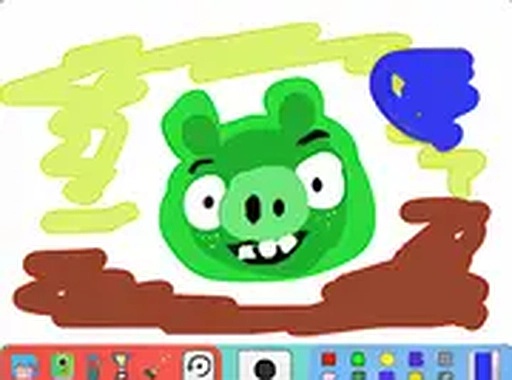
Creative Canvas Friends Drawing Game is a free online activity that combines art with a unique scoring system. Players create artwork on a digital canvas and receive a score based on how detailed and cute their drawing is. What makes this game special is its use of neural network technology to evaluate the art, focusing on elements like color usage, depth, and facial expressions—especially big eyes and fun looks. Designed for players of all ages, it offers a safe, family-friendly environment to explore creativity and improve drawing skills. The game runs smoothly in a browser on a desktop computer, with no downloads required, and is completely free to play. It encourages experimentation and self-expression without pressure, making it suitable for beginners and experienced artists alike.
How to Play
To play Creative Canvas Friends Drawing Game, players select colors and drawing tools from the available options to create artwork on the canvas. As they draw, the neural network algorithm analyzes the creation in real-time, providing feedback on detail and cuteness. Players can experiment with different styles, such as adding vibrant colors, shading for depth, and cute features like big eyes and playful expressions to boost their score. The game is intuitive and easy to pick up, allowing players to start without complex instructions. For a more immersive experience, players can use full screen mode. After finishing, they can share their art with friends.
Game Features
Creative Canvas Friends Drawing Game includes a neural network scoring system that rates artwork based on detail and cuteness. It provides real-time feedback as players draw, helping them see how their choices affect their score. The game offers a wide selection of colors and drawing tools to create a masterpiece. It supports full screen mode for an immersive drawing experience. The game requires no downloads, running directly in a browser on a desktop computer. It is completely free to play and provides a safe, family-friendly environment suitable for kids and families.
Tips for Success
To achieve higher scores in Creative Canvas Friends Drawing Game, focus on adding details to artwork, such as using a variety of vibrant colors and incorporating shading to create depth. Pay special attention to facial expressions—drawing big eyes and playful looks can significantly boost the cuteness score. Experiment with different styles and techniques to see how the neural network responds. Practice regularly to improve drawing skills and learn which elements the scoring system values most. Don't be afraid to try new ideas, as the game encourages creativity without pressure.